Think it through.
Ask questions, work through a document, explore ideas, and shape a response in a focused conversation.
One assistant for your inbox, your code, and your team.
Bring context together, plan the work, and review what happens next. Atlas is being built to move from conversation to useful action—with you in control.
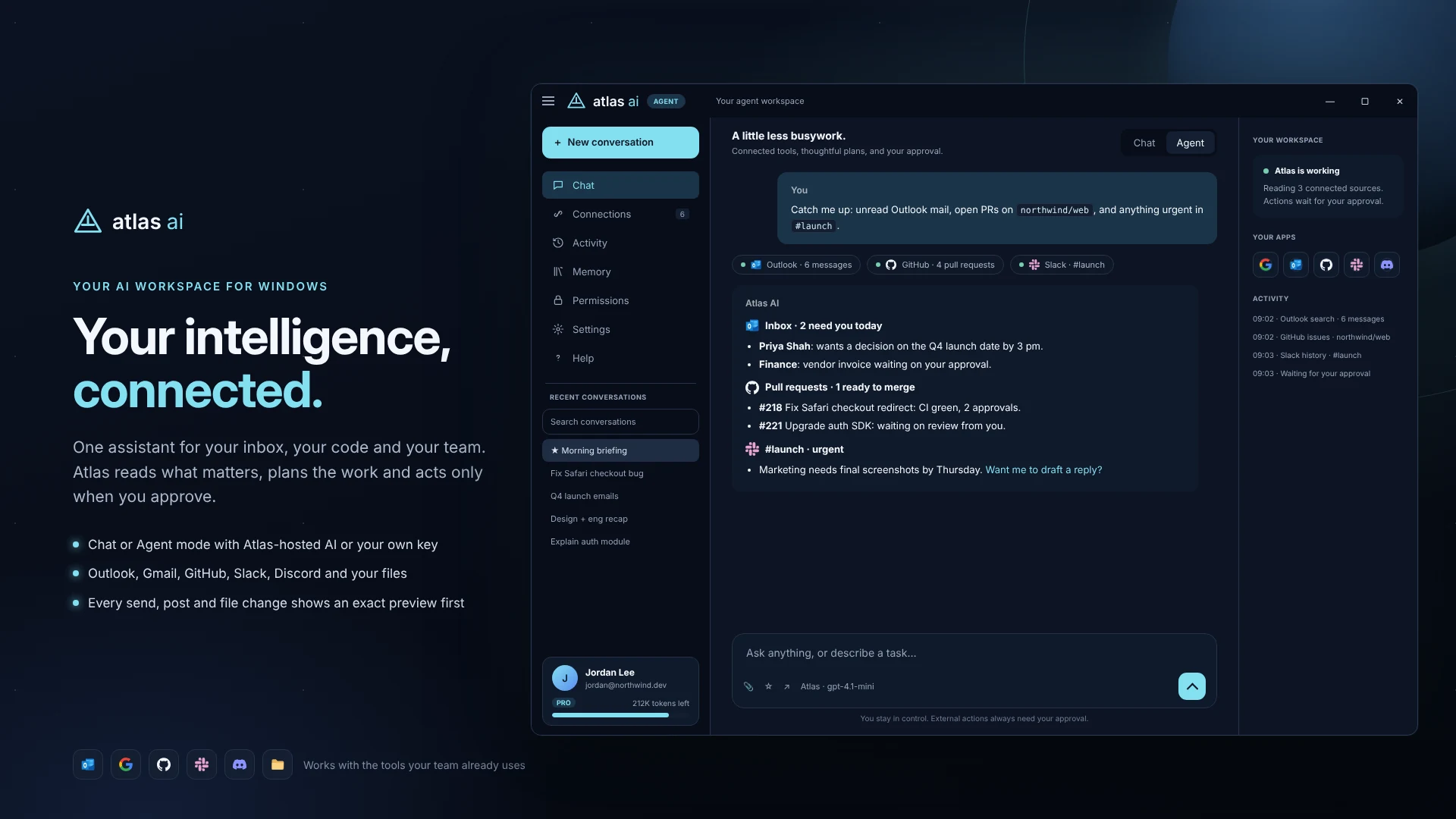
Explore Atlas through Atlas product workflows. Switch between examples to see the interface, context, drafts, and approval controls.
Ask questions, work through a document, explore ideas, and shape a response in a focused conversation.
Give Atlas a goal. The agent workflow brings together approved sources, organizes the task, and prepares actions for you to review.
Follow the tools and sources involved, see what is waiting, and review the history of actions in your workspace.
Atlas is being developed around the places work happens: messages, repositories, documents, and the people you work with.
Find relevant messages across Outlook and Gmail, summarize long threads, and prepare a reply with the right context. Calendar-aware planning helps turn a conversation into a proposed next step.
Bring repository context into the conversation. Explore issues and pull requests, inspect relevant files, and work through proposed changes in a form you can review.
Turn busy channel discussions into a clear recap of decisions, blockers, and follow-ups. Bring Slack and Discord discussions into the same planning workflow.
Explore documents and repositories within approved folders. Ask how a module works, review a brief, or map the files involved in a change.
Choose the accounts and sources relevant to your task. The connection lineup below reflects the product roadmap; availability and permissions will be confirmed before release.
Email context, draft replies, and calendar-aware planning.
Relevant messages and conversations in your workspace.
Repository issues, pull requests, files, and proposed comments.
Channel context, summaries, and updates for review.
Approved channel discussions and team follow-ups.
Documents and code within folders you approve.
Connections require your authorization and the appropriate account permissions. Supported services may vary by application and release. Third-party names and logos belong to their respective owners; inclusion does not imply endorsement or partnership.
Atlas is designed to make external actions explicit. Review the recipient, destination, content, or file change before you approve it.
Connect the sources and approve the folders relevant to your work.
Inspect a proposed email, channel update, or file change before it is carried out.
Decide what proceeds. Follow activity and receipts as the workflow moves forward.
Choose your monthly capacity. The planned launch lineup includes Chat, Agent, and connected-tool workflows across all three tiers.
$0 / month
10,000 Atlas tokens / month
Get started with the Atlas workspace.
$10 / month
250,000 Atlas tokens / month
More capacity for regular conversations and documents.
$25 / month
1,000,000 Atlas tokens / month
The largest monthly allowance for more extensive work.
Need more room? Planned top-ups add 100,000 Atlas tokens for $5. Monthly tokens reset each cycle; purchased top-ups carry forward and are used after monthly tokens.
Bring your own key. The product direction includes OpenAI and Gemini keys. Provider usage is billed separately and does not spend Atlas tokens.
Planned monthly pricing in USD. One Atlas token represents an AI input or output token. Applications, subscriptions, top-ups, and connected services remain in development. Final limits and availability will be confirmed before enrollment. No checkout or payment collection is available on this website.
Windows and web are the focus of the initial application releases. iOS and Android development is planned for a later release.
Atlas is a product by Point Software Solutions.
Our team is building a practical assistant for connected work, with a focus on clear design, useful context, and human control.
Meet Point Software Solutions ↗Express your interest in Atlas AI and select the platform that matters to you.
Release timing and invitation availability will be announced separately.
Atlas AI is in development. This website introduces the product and its planned workflows. Application access and subscriptions are not open.
Chat centers on questions, explanations, drafting, and ideas. Agent workflows are designed to use approved tools and sources to work through a goal, with external actions presented for review.
The planned tiers include 10,000, 250,000, and 1,000,000 Atlas tokens per month respectively. The core product direction includes Chat, Agent, and connected-tool workflows across tiers.
Atlas is being designed to preview actions that send, post, or change files and request your approval before executing them.
Yes. AI can make mistakes. Review generated content, proposed changes, and important information before relying on them.